Book Review: Trixbox CE 2.6 from Packt
[Please Note: If you use the book links from this site to Packt’s and decide to buy *any* book from their site, we will get a small commission that we’ll use towards the upkeep of our servers etc.]
Trixbox CE 2.6
Following on the heels of the Asterisk AGI Programming book review, Packt asked me to take a look at this one.
trixbox itself is a “packaged solution” comprising the operating system, Asterisk and a back-end/front-end configuration tool based on FreePBX. Personally, I’m from the “old school” when it comes to applications and I do like to know what makes them tick. So with Asterisk for example, when I first started looking at it I wanted to try and understand the configuration files and how it really worked so I installed from source and built everything from scratch. trixbox CE (Community Edition) on the other hand provides a user-friendly front end to Asterisk and wraps the whole thing up with an OS and delivers the bundle as a free download which is a ready-to-run ISO.
I guess one downside to the appliance package like trixbox is that you are tied into using the vendor’s choice of OS (CentOS in this instance) rather than your own. However, there are several advantages too: you know it works, has been tested all together and is supported, to whatever extent the community provides, by the producer. Anyway, this post isn’t a plug for Ubuntu or a review of the trixbox product itself. This is a review of a book about trixbox.
Before we get into the book though, for those who are unfamiliar with what trixbox is, their website tells us:
Beginning in 2004 as Asterisk@Home, the trixbox® Community Edition (CE) telephony application platform is the open source software that has quickly become the most popular Asterisk®-based distribution in the world. trixbox CE combines the best of the open source telephony tools into one easy-to-install package, along with the trixbox dashboard which provides a web-based interface to configure and manage a complete IP-PBX system. The most flexible and customizable communications platform available, trixbox CE averages over 65,000 downloads a month.
And the Wikipedia, in what must be one of the shortest pages in the entire Wikiverse, states:
Trixbox CE is 100% free and licensed under the GPLv2. Founding members of the trixbox CE project are Kerry Garrison and Andrew Gillis.
The trixbox CE brand is now owned by Fonality. Documentation, help and community forums can be found at www.trixbox.org
So that’s what the book is supposed to be telling us about. Let’s see if does…
It is subtitled “Implementing, managing, and maintaining an Asterisk-based telephony system” and written by Kerry Garrison. It’s quite a hefty tome weighing in at around 300 pages and is produced with Packt’s professional and easy-to-read layout & styling.
Chapter 1 is a brief introduction into the whole telephony scene covering subject such as what a PBX is. It then moves the reader toward an overview of the key features of Asterisk. For the most part the author has a good writing style and gets the information over with clarity. There is some good advice too; whilst obviously the author wants to explain why trixbox is the bees knees, he does make a very sensible comment early on:
While trixbox CE does make using Asterisk dramatically easier, it is certainly a good idea to really get in and learn all you can about the Asterisk configuration files. The more you know about how the system works under the hood the easier it will be for you to troubleshoot problems and even add features to your systems that aren’t available in trixbox CE.
Chapter 2 introduces the reader to trixbox itself:
- Going over some of it’s history,
- briefly mentioning the commercial trixbox packages available from Fonality,
- looking at the core components that make up trixbox
- trixbox features with lots of screenshots
- and what you will need to try out trixbox such as a PC, perhaps an analogue line card and a SIP phone.
There are lots of URLs scattered about where necessary directing the reader to further sources of reading or links to relevant vendors and downloads etc. For someone who is getting started this is a good resource and introduction.
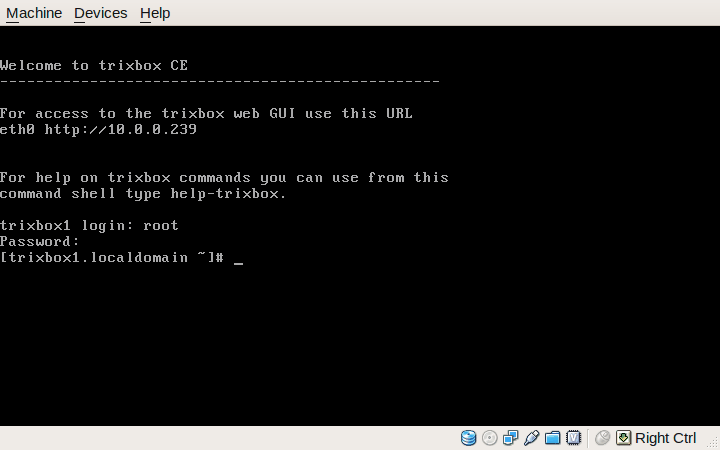
trixbox console after first boot
In Chapter 3 we get shown how to install trixbox, even showing novice readers how to burn a CD if you happen to be unfortunate enough to be using Windows.
I followed this chapter through myself and installed trixbox CE 2.6 in a VirtualBox VM. The instructions were good with plenty of screenshots and comments guiding the reader through the process. (Just FYI, on my PC Lobsang, the entire install in a Virtual Machine took just about 3 minutes!. During the first boot up I noticed that it uses the excellent OSLEC echo canceller by default. That’s a plus mark from me.)
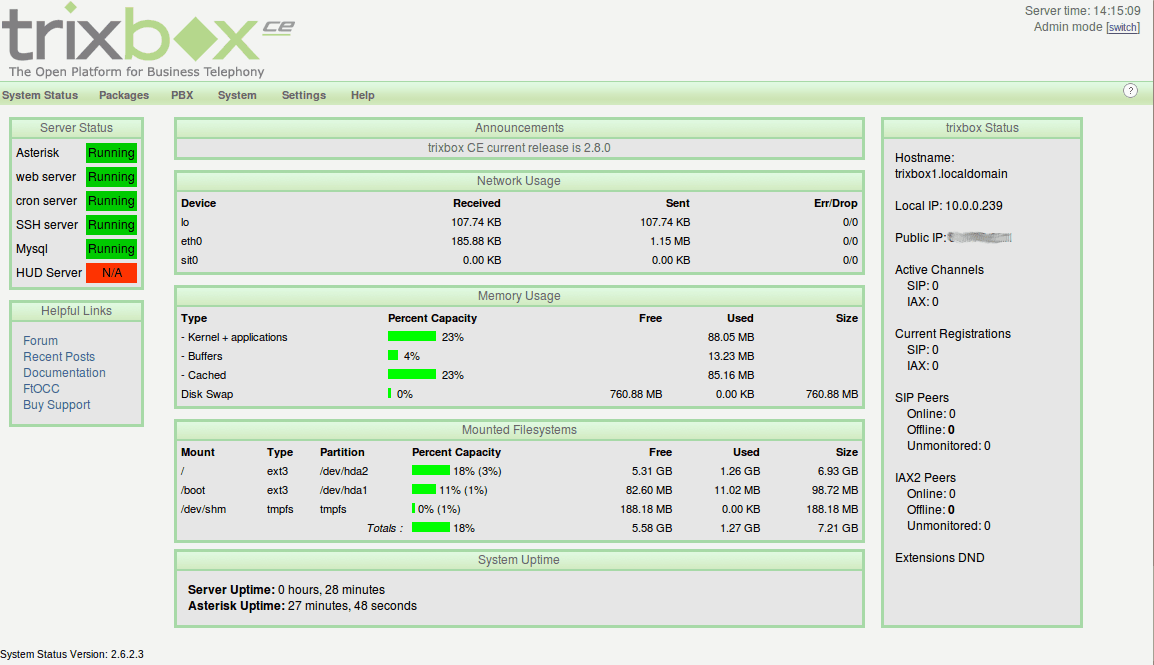
The trixbox status screen
Continuing through the chapter, after installing and doing a
yum update we are guided to the browser interface of trixbox…
The rest of Chapter 3 explains the various screens and basic navigation techniques to get around. Once again, I’d say the book is comprehensive and has plenty of screenshots and comments.
I’m not going to write about every chapter because, to be honest, the rest of the book is equally well put together and covers the subject in detail. Chapters 3 to 11 are what a good manual would be like. Having digested these chapters, the reader will know a good deal of how (and perhaps more importantly why) to plan, select hardware, install, setup, configure and maintain a trixbox system. There is plenty of “extra” information thrown in that explains what various features or aspects of the system are for and how they work. References to external sources abound and other vendors are given a decent mention where appropriate. Simply put, it’s good. If you want to use or manage a trixbox CE system this book would be an excellent resource in my opinion.
The final part of the book, Chapters 12 to 17, provide somewhat more orthogonal, but nevertheless valuable, information. We get to find out a little about:
- troubleshooting techniques and also where else to go to learn further skills,
- some of the additional trixbox utilities that are available like the endpoint manager,
- the basics of designing a decent callflow for the IVR,
- an introduction to a new end-user interface called HUD (Head Up Display),
- and an overview of the commercial trixbox Pro products.
In summary then, this is another good book from Packt that hits all the right buttons. It is well written, very detailed, and has good explanations of technologies and applications related to IP telephony.
As to it’s main purpose, that is explaining how to deploy and use trixbox CE, in my opinion this what a decent product manual should be like.
Asterisk, Zaptel, Oslec and Ubuntu Server [Updated]
I have recently migrated my server at home from a custom Linux build to Ubuntu Server (8.10 Intrepid). The main migration went very smoothly and I learned a few new tricks on the way too.
One function the server performs is as my telephone system for work and home. It runs Asterisk. I have a couple of IAX2 trunks from our VOIP provider for mine and my wife’s businesses and I also have a cheap x100p clone analogue card for PSTN backup purposes. On my old system software, I had compiled the device drivers (zaptel) and kernel modules for the card manually and used a, frankly fantastic, echo canceller called Oslec (the Open Source Line Echo Canceller). You can read the couple of posts I made about when I first tried it out here.
On my new server OS, I installed the Asterisk server via Ubuntu’s package management system sudo apt-get install asterisk. After some digging around on the ‘net (and it wasn’t obvious) I discovered that the zaptel drivers (for the PSTN hardware) need to be installed slightly differently:
sudo m-a -t build zaptel Which retrieves the zaptel package and builds it for your running kernel.m-a prepare in advance of this to retrieve your Linux kernel headers.
The m-a (Module Assistant) command will compile and create a .deb package in the /usr/src directory. On my system the package was called zaptel-modules-2.6.27-11-server_1.4.11~dfsg-2+2.6.27-11.27_i386.deb.
It can then be installed using dpkg: sudo dpkg -i zaptel-modules-2.6.27-11-server_1.4.11~dfsg-2+2.6.27-11.27_i386.deb.
This went fine and I had read on launchpad that as of an earlier version of the zaptel package the Oslec echo canceller was now the default. Unfortunately this didn’t quite work as I expected. The zaptel module was in fact using the standard MG2 EC which is not very good with my x100p card at all.
After a bit more digging around in the source code, there is a file in the zaptel package called zconfig.h which is where the chosen EC is defined. It is specified as MG2 in the package. What I did to fix it was as follows.
Unpack thezaptel.tar.bz2package that was in/usr/src.Edit thekernel/zconfig.hfile so the line#define ECHO_CAN_MG2is commented outand added in a line that reads#define ECHO_CAN_OSLECinstead.Re-assemble the zaptel package:sudo tar jcvf zaptel.tar.bz2 modules(“modules” is the directory name where the zaptel package extracts to).Delete the existing zaptel-blah-blah.deb file and the modules directory too.Re-run them-a -t build zaptelcommand.
Thanks to Tzafir Cohen on the asterisk mailing list for this. There is a far simpler method to use for the time being although this is a known bug and is now fixed in the development tree so I guess it will be unnecessary once the package has been updated. Do please check first if you are following this in the months to come. Anyway, instead of the commands above, these commands work for me and are far simpler:
sudo m-a -f get zaptel-source This simply gets the source package and saves it in /usr/src.
sudo ECHO_CAN_NAME=OSLEC m-a -t a-i zaptel And this builds and installs the modules and tells the build scripts to choose the Oslec EC by default. The -t switch puts the command into text mode so you actually see what is going on. I find the process rather opaque and uninformative without this switch.
After rebuilding, the zaptel module now requires, and loads the Oslec EC by default. The command modinfo zaptel is a good test. The output of it should be something like this:
filename:          /lib/modules/2.6.27-11-server/misc/zaptel.ko

version:            1.4.11

license:            GPL

description:      Zapata Telephony Interface

author:             Mark Spencer

srcversion:       4433ADDE0493C798A455677

depends:          oslec,crc-ccitt

vermagic:         2.6.27-11-server SMP mod_unload modversions 686

parm:               debug:int

parm:               deftaps:int
Note the “depends” line.
You could also type lsmod | grep 'zaptel' once you have reloaded your server:
zaptel                199844  5 wcfxo

oslec                  16668  1 zaptel

crc_ccitt              10112  1 zaptel
This command shows the oslec ec module installed along with the the zaptel and wcfxo drivers.
One final point to note. If you just want to load a particular telephony hardware driver and not all of them, I think you need a file /etc/default/zaptel like this with the relevant driver(s) uncommented:
TELEPHONY=yes

DEBUG=yes
# Un-comment as per your requirements; modules to load/unload
#Module Name Hardware
#MODULES="$MODULES tor2" # T400P - Quad Span T1 Card
#E400P - Quad Span E1 Card
#MODULES="$MODULES wct4xxp" # TE405P - Quad Span T1/E1 Card (5v version)
# TE410P - Quad Span T1/E1 Card (3.3v version)
#wct4xxp_ARGS="t1e1override=15" # Additional parameters for TE4xxP driver
#MODULES="$MODULES wct1xxp" # T100P - Single Span T1 Card
# E100P - Single Span E1 Card
#MODULES="$MODULES wcte11xp" # TE110P - Single Span T1/E1 Card
#MODULES="$MODULES wctdm24xxp" # TDM2400P - Modular FXS/FXO interface (1-24 ports)
MODULES="$MODULES wcfxo" # X100P - Single port FXO interface
# X101P - Single port FXO interface
#MODULES="$MODULES wctdm" # TDM400P - Modular FXS/FXO interface (1-4 ports)
I can’t recall the exact origins of this file and whether or not it is really necessary, but I had it on my old system and the Ubuntu provided zaptel init script checks for it’s presence; although it doesn’t look like it does much with its contents though…
Hopefully this will help others and also act as a bit of an aide memoir for me when I next build an Ubuntu server with Asterisk.
Open Source Cars and More
I love this article on zdnet from David Greenfield. It’s a round-up of what’s happening in the up and coming area of Open Source Hardware. According to David,
A burgeoning trend in open source hardware is putting up some devices on the Web — from machines that make anything (including themselves) to cars — with the specs to make them yourself (See our list below). While still in its infancy, the trend could redefine hardware cost models much as its done for software.
And there are some neat really ideas like this one which I have been following myself for a while:
Now that you’ve got Asterisk, what hardware platform will you run the software on? Usually folk settle on a Intel or AMD based-server of one kind or another. You can build your own PBX hardware with the Astfin Project or buy one for just $450 from the Free Telephony Project store.
This Asterisk appliance project has the chap who wrote the brilliant Open Source Echo Canceller I mentioned before in it.
But how about your own, Open Source Car…
Open Source isn’t just for your office. The OScar aims to be the first open source automobile. The goal is to create a utilitarian car that aims to move people from place-to-place sans a lot of the high-tech gadgetry that runs in today cards. Initial concepts call for a four-door, four meter length vehicle weighing about 1000 Kilo capable of reaching 145 KM/hour.
Cool – just the thing to keep a man happy and content in his shed for months. 😉
Untangle, Asterisk PBX and File Server; All-in-One. Part 7.1 (OSLEC)
O.K. I said I’d write a bit about an excellent new echo canceller which happens to work with Asterisk. Here it is it’s called OSLEC the Open Source Line Echo Canceller and it’s written by a chap called David Rowe.
As readers may recall, I’ve built a small home server (VIA CN700) on which I plan to run Asterisk, Samba and Untangle. Samba is up and running and Asterisk is too. I have a single port, very cheap (about £15 inc postage from the USA) x100p card providing an interface to a normal analogue PSTN telephone line.
When we got everything working, we noticed a great deal of echo on voice calls over the x100p. Lots of playing with gains and various settings in the zaptel configuration failed to make any noticeable difference.
I came across this site whilst looking for something completely different and started to read… It sounded like just the thing. A bit of jiggery and a quick patch to the zaptel-1.4.5.1 sources – thanks to the asterisk mailing list – and I got the OSLEC canceller working.
Basically here’s what to do:
- Build the OSLEC module (it will need to find your kernel sources – just like zaptel) according to the instructions on the website. Once built and you’ve checked that you can install it by inserting the module into your running kernel, copy it (oslec.ko) to your kernel’s loadable module directory: on my system the zaptel modules reside in
/lib/modules/2.6.23/misc/so that’s where I put the oslec module too. - Patch your zaptel source tree (if you have version 1.4.5.1 you will need to patch
Makefile.kernel26or OSLEC will never get loaded) and rebuild and re-install as described. (Caution: Backup your/etc/zaptel.conf, /etc/asterisk/zapata.confand your modified SysV init scripts so you can simply overwrite the default files installed when you rerunmake installon the zaptel sources.) - Edit your zapata.conf so the following are as below:
echocancel=yes

echocancelwhenbridged=no

;echotraining=400 - Reload everything (if in doubt, stop asterisk and zaptel using your SysV init scripts, e.g # /etc/rc.d/init.d/{asterisk,zaptel} stop. Then start them again. When zaptel starts you should see a message saying Echo canceller OSLEC or something like that; if it says MG2 then it isn’t working so you need to go back and recheck your build and patching and module loading.
That’s it.
Now make or receive a call through your cheap x100p card and marvel at the clear echo free sound! It worked brilliantly for me. Of course YMMV but it is definitely worth a try. Most of the reports on the ‘net are incredibly positive about this.
Untangle, Asterisk PBX and File Server; All-in-One. Part 7
There’s no Untangle in this installment – I’m awaiting a new kernel from the developers before I can get any further; it should be here shortly however.
In the previous article of this series I mentioned that I’d explain how to get Asterisk built and running as a non-root user. It wasn’t too hard to be honest but I’ll document it anyway.
The problem: Asterisk by default, when compiled from source, expects to be run as root. For userspace applications, this is NEVER a good idea in my opinion. After all we’re running on a multi user system that can support non-root processes – unlike Windows – so we really should… 😉
The solution for Asterisk-1.4.13 on my LFS based system, is as follows:
Build any hardware add-ons and codecs you need before building Asterisk. I built the Zaptel module for my x100p card and the Speex Open Source VBR codec. The zaptel module needs to find your kernel source tree (usually in /usr/src/linux-2.6.x.x). To build the zaptel source:
./configure --prefix=/usr (to select/deselect the modules you wish to build)
make menuselect
make
then as root:
make install
and optionally:
make config This will install the SysV init scripts and some default configuration files. You may need to modify the init scripts depending on your system.
Simply follow a similar process for the Speex codec…
For Asterisk, start off by creating a group and user that will run and own the asterisk process and files (select {G,U}IDs and names that are appropriate for your system).
groupadd -g 75 asterisk

useradd -c "Asterisk PBX" -d /var/lib/asterisk -g asterisk -s /bin/false -u 75 asterisk
Edit the Makefile in the top of the asterisk source tree so that the line:
ASTVARRUNDIR=${localstatedir}/run becomes ASTVARRUNDIR=${localstatedir}/run/asterisk
Then build as normal
./configure --prefix=/usr (Turn on/off various modules and options. Select sound files/language/format and extra sounds. Type “s” to save and exit)
make menuselect
make
Then as root:
make install
Asterisk is now installed. But because we will run the process as non-root it needs write permissions for these directories and their contents:
/var/lib/asterisk, /var/log/asterisk, /var/run/asterisk, /var/spool/asterisk, /dev/zap/*.
If you installed the zaptel modules and used the ‘make config’ command, a udev rules file (zaptel.rules) will be written to /etc/udev/rules.d. This enables, by default, udev to create the zaptel device files as user:group asterisk. If you chose another name above you will need to edit this file accordingly.
O.K., lets sort out the ownership and access to the files Asterisk needs. First change the owner:
chown -R asterisk:asterisk /var/{lib/asterisk,log/asterisk,run/asterisk,spool/asterisk}
Now set read/write only by owner, read only by group and no access by other:
chmod 750 /var/{lib/asterisk,log/asterisk,run/asterisk,spool/asterisk}

chmod -R o= /var/{lib/asterisk,log/asterisk,run/asterisk,spool/asterisk}
This switch (chmod -R o=) is pretty cool by the way. It removes all access to all files and directories for the “other” classification, effectively setting them to “0” but does not change or overwrite any of the permissions for owner and/or group access.
The asterisk process itself only needs read permission for the configuration directory (/etc/asterisk) and its contents (almost1):
chown -R root:asterisk /etc/asterisk

chmod 750 /etc/asterisk

chmod 640 /etc/asterisk/*
Some of Asterisk’s ‘.conf’ files contain cleartext passwords and other potentially sensitive information. Setting the files as above permits read/write only by the user root and read only by members of the group asterisk.
That’s it basically. When you start asterisk from the SysV init scripts, pass the following arguments to have it run, safely, as your new user:
asterisk ${DEBUG} ${ZAP_TIMING} -U ${USER} -G ${GROUP}
In my startup script, I’ve set those constants above to be:
# If you want debug messages to the console and the logs switch the

# comments below

DEBUG=""

#DEBUG="-d"
# The user and group we created earlier

GROUP="asterisk"

USER="asterisk"
# Use this if you want to limit the maximum number of simultaneous calls

# to prevent system failure for example

MAXCALLS=""

#MAXCALLS="-m 20"
# If you have a Zaptel card/timing source, enable it here

#ZAP_TIMING=""

ZAP_TIMING="-I"
That’s it.
When asterisk starts, it will run as the user and group defined above. In the next installment, I will write a bit about a fantastic new echo canceler which sorts out cheap x100p cards and makes them work properly… It’s really excellent.
1. Except for voicemail.conf. When a user changes their pin asterisk writes these changes to the voicemail.conf file.


