Book Review: Trixbox CE 2.6 from Packt
[Please Note: If you use the book links from this site to Packt’s and decide to buy *any* book from their site, we will get a small commission that we’ll use towards the upkeep of our servers etc.]
Trixbox CE 2.6
Following on the heels of the Asterisk AGI Programming book review, Packt asked me to take a look at this one.
trixbox itself is a “packaged solution” comprising the operating system, Asterisk and a back-end/front-end configuration tool based on FreePBX. Personally, I’m from the “old school” when it comes to applications and I do like to know what makes them tick. So with Asterisk for example, when I first started looking at it I wanted to try and understand the configuration files and how it really worked so I installed from source and built everything from scratch. trixbox CE (Community Edition) on the other hand provides a user-friendly front end to Asterisk and wraps the whole thing up with an OS and delivers the bundle as a free download which is a ready-to-run ISO.
I guess one downside to the appliance package like trixbox is that you are tied into using the vendor’s choice of OS (CentOS in this instance) rather than your own. However, there are several advantages too: you know it works, has been tested all together and is supported, to whatever extent the community provides, by the producer. Anyway, this post isn’t a plug for Ubuntu or a review of the trixbox product itself. This is a review of a book about trixbox.
Before we get into the book though, for those who are unfamiliar with what trixbox is, their website tells us:
Beginning in 2004 as Asterisk@Home, the trixbox® Community Edition (CE) telephony application platform is the open source software that has quickly become the most popular Asterisk®-based distribution in the world. trixbox CE combines the best of the open source telephony tools into one easy-to-install package, along with the trixbox dashboard which provides a web-based interface to configure and manage a complete IP-PBX system. The most flexible and customizable communications platform available, trixbox CE averages over 65,000 downloads a month.
And the Wikipedia, in what must be one of the shortest pages in the entire Wikiverse, states:
Trixbox CE is 100% free and licensed under the GPLv2. Founding members of the trixbox CE project are Kerry Garrison and Andrew Gillis.
The trixbox CE brand is now owned by Fonality. Documentation, help and community forums can be found at www.trixbox.org
So that’s what the book is supposed to be telling us about. Let’s see if does…
It is subtitled “Implementing, managing, and maintaining an Asterisk-based telephony system” and written by Kerry Garrison. It’s quite a hefty tome weighing in at around 300 pages and is produced with Packt’s professional and easy-to-read layout & styling.
Chapter 1 is a brief introduction into the whole telephony scene covering subject such as what a PBX is. It then moves the reader toward an overview of the key features of Asterisk. For the most part the author has a good writing style and gets the information over with clarity. There is some good advice too; whilst obviously the author wants to explain why trixbox is the bees knees, he does make a very sensible comment early on:
While trixbox CE does make using Asterisk dramatically easier, it is certainly a good idea to really get in and learn all you can about the Asterisk configuration files. The more you know about how the system works under the hood the easier it will be for you to troubleshoot problems and even add features to your systems that aren’t available in trixbox CE.
Chapter 2 introduces the reader to trixbox itself:
- Going over some of it’s history,
- briefly mentioning the commercial trixbox packages available from Fonality,
- looking at the core components that make up trixbox
- trixbox features with lots of screenshots
- and what you will need to try out trixbox such as a PC, perhaps an analogue line card and a SIP phone.
There are lots of URLs scattered about where necessary directing the reader to further sources of reading or links to relevant vendors and downloads etc. For someone who is getting started this is a good resource and introduction.
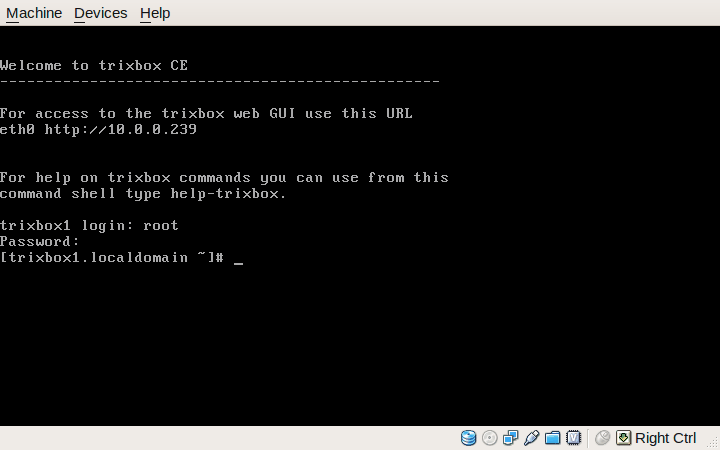
trixbox console after first boot
In Chapter 3 we get shown how to install trixbox, even showing novice readers how to burn a CD if you happen to be unfortunate enough to be using Windows.
I followed this chapter through myself and installed trixbox CE 2.6 in a VirtualBox VM. The instructions were good with plenty of screenshots and comments guiding the reader through the process. (Just FYI, on my PC Lobsang, the entire install in a Virtual Machine took just about 3 minutes!. During the first boot up I noticed that it uses the excellent OSLEC echo canceller by default. That’s a plus mark from me.)
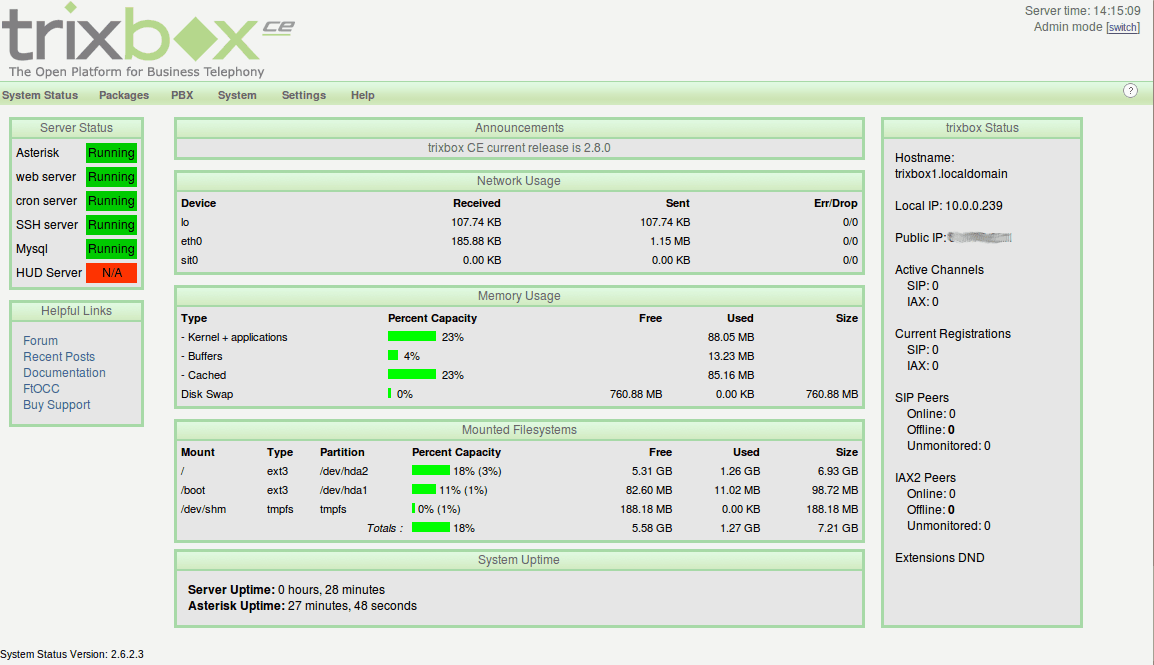
The trixbox status screen
Continuing through the chapter, after installing and doing a
yum update we are guided to the browser interface of trixbox…
The rest of Chapter 3 explains the various screens and basic navigation techniques to get around. Once again, I’d say the book is comprehensive and has plenty of screenshots and comments.
I’m not going to write about every chapter because, to be honest, the rest of the book is equally well put together and covers the subject in detail. Chapters 3 to 11 are what a good manual would be like. Having digested these chapters, the reader will know a good deal of how (and perhaps more importantly why) to plan, select hardware, install, setup, configure and maintain a trixbox system. There is plenty of “extra” information thrown in that explains what various features or aspects of the system are for and how they work. References to external sources abound and other vendors are given a decent mention where appropriate. Simply put, it’s good. If you want to use or manage a trixbox CE system this book would be an excellent resource in my opinion.
The final part of the book, Chapters 12 to 17, provide somewhat more orthogonal, but nevertheless valuable, information. We get to find out a little about:
- troubleshooting techniques and also where else to go to learn further skills,
- some of the additional trixbox utilities that are available like the endpoint manager,
- the basics of designing a decent callflow for the IVR,
- an introduction to a new end-user interface called HUD (Head Up Display),
- and an overview of the commercial trixbox Pro products.
In summary then, this is another good book from Packt that hits all the right buttons. It is well written, very detailed, and has good explanations of technologies and applications related to IP telephony.
As to it’s main purpose, that is explaining how to deploy and use trixbox CE, in my opinion this what a decent product manual should be like.
Windows is Dead (almost). Long Live Free & Open Source Software, i.e. Ubuntu
Finally.
My wife’s PC was the last bastion of proprietary software hell remaining in our home (and we have quite a few PCs). 2 days ago, Helen explained that she’d been having a nightmare with Windows. You’d start to login and immediately it would log you out again! Nice. And there was no easy way to prevent it. “Safe Mode” did the same thing. Very helpful – not. Googling threw up a lot of people with the same experience and some rather dodgy sounding workarounds to rectify the situation.
Helen has had a dual boot setup for a while, has been getting used to the nuances of Ubuntu and the Gnome desktop and is now fairly comfortable with it. So, rather than trying to fix an inherently broken OS we decided to make the switch. There was one caveat however; iTunes. Her work is a franchised music therapy business for elderly and disabled residential care homes. She uses a big iPod and iTunes to manage her many playlists etc., and all the music is in Apple’s lossless proprietary format. (I know, but I didn’t have an opportunity to suggest an alternative at the time…)
To make the move to Ubuntu as painless as possible I bought some more RAM and a 320GB HDD from Scan Computers to give her some more space and also just in case I ended up needing to do a fresh Windows install for a dual-boot setup. But my plan was to first of all attempt to use VirtualBox for the iTunes requirement. Unfortunately Wine didn’t seem like a viable option at this time.
After what seems like far too much effort, the iTunes Library is now hosted on our home server so it can be backed up easily. A VirtualBox (the closed source PUEL edition for USB passthrough) VM is running a fresh new install of XP and only iTunes, and it connects via a Samba share (Windows is configured to re-connect the network drive (Z:) on startup) to the music library.
The iTunes library was a complete PITA to move. There are lots of how tos and such like on the web but when it boils down to it, you need to check, very carefully, the structure in the iTunes Library.xml file so it matches the new location of the music itself. What didn’t help me was discovering, after several failed attempts, that iTunes at some stage in the past, had decided to create two complete “Compilation” and “Podcasts” directory structures, each with mostly different content, but some of it overlapping.
Essentially, the process is something like this:
- Backup the whole library!
- Create the new library location and copy in the data
- Delete the
*.itlfiles from the root of the iTunes library - Examine the
iTunes Library.xmlfile and use a good editor/comparison tool to alter all the paths so they point to the correct locations in your new library structure - Fire up iTunes, edit the Music Library location to where the new one lives
- Under the File menu (IIRC) you choose “import library” and point it at your modified
iTunes Library.xmlfile - Cross your fingers, toes and anything else 😉
Judicious use of that great comparison tool Meld and my eyeballs meant that finally I managed to restructure the library so it was consistent and not duplicated. I think that had it not been like this, my experience would not have been so bad or so lengthy, but iTunes will leave always a very nasty taste in my mouth. Also, had Windows not completely barfed (again) I would have been able to use the already installed iTunes app and move the library using it’s own built in tools (as this is apparently possible according to the interweb).
Probably the next step will be to introduce Helen to Songbird (or similar) and see if we can migrate the library, playlists and music across to that. I’ll do some playing on my own before suggesting it though. Small steps to catchy monkey I think.
VirtualBox 3.02 seems to be really good though. The USB pass through and auto-filtering is just brilliant (so Ubuntu doesn’t alert when you plug in the iPod when the VM is running; it goes straight through to the Windows VM). It does seem to take quite a long time for the whole Windows/iTunes thing to settle down after I’ve plugged the iPod in but it might be just because it’s a big 120G iPod anyway… But it isn’t a major issue.
So, although Windows isn’t completely dead in our household, it is certainly on its very last legs. And good riddance to it to.
Migrating from Windows
The last Windows computer in our house is very shortly going to be history 🙂
I have been threatening my wife’s PC for quite some time now, but there has been no real motivation to move until today… Our bank called and told her a credit card has been fraudulently used in the last few days. Fortunately they appear to have correctly and swiftly identified the misuse and are dealing with the problem.
However, this experience has obviously caused my beloved (Helen) to start wondering how her details were captured in the first place. She is pretty scrupulous with the shredder, and this particular card is almost only ever used for on-line transactions; so her PC was a possible, if not likely, route for the thieves. The ClamWin AV scan threw up a few nasty sounding files, including some IE.IFrame trojan thing, although they had all been quarantined already. But the fact that Windows is so vulnerable to attack and subsequent compromise when compared to Linux, this saga has just tipped the scales. We now have a good reason to start the final migration of the Lord household.
This evening, I have installed Thunderbird on Helen’s Windows PC and imported everything from her Outlook email client. The import was basically flawless and after changing a few settings she’s now up and running with TB. (Interestingly, her first few comments were very positive: “This looks nice”, “It’s much faster”, “I like the address book layout” and so forth.) I added Lightning and connected her up to our caldav Calendar Server (Cosmo) which is an added bonus for Helen. We all use this for work, family and personal scheduling and Helen had been limited to using web access (simply because Outlook doesn’t support the Caldav standard) which is not the optimum interface to this calendar.
Helen was already using Firefox most of the time but now I’ve asked her to stop using IE altogether.
Helen also has OpenOfice.org (OOo) installed already but has not been using it much as the Windows defaults are [were] set for MSO 2003. This will probably be the area where there will be some new learning as she stops using MSO and starts using OOo but it isn’t that painful to be frank.
I think within a month, I will install Ubuntu 8.10 as a dual boot for a short period just in case she finds there are things that don’t work and then we’ll turn off the malware-that-pretends-to-be-an-OS Windows within a few weeks from then.
She does use iTunes for her work and pleasure so I am thinking we’ll need to have a VM (VirtualBox) running her copy of XP to support that, unless someone would like to offer advice on alternatives. She runs music therapy classes and her material is ripped onto her iPod using Apple’s lossless codec IIRC that iTunes seems to default to. Never having used it myself, nor do I own an iPod I am not the best source of advice on this one so if anyone can help here I’d be grateful.
I can’t think there is much else that will bite us though; she doesn’t have any other proprietary apps I can see that are going to prove troublesome to replace.
One thing that is really important in this story is this ability to run the main applications: Firefox, Thunderbird and OpenOffice.org, on both Windows and Linux platforms. It will make the transition, for a non-technical user, much less painful than having to switch wholesale over to new apps and a new OS all at the same time. Thanks Mozilla and OOo.
As we go through this migration I’ll write a little more (I might even ask Helen to document her experiences and thoughts). Hopefully it will help others doing, or wanting to do, the same thing.
Starting VirtualBox VMs from an Icon or CLI
I get an amazing number of hits (relatively speaking) from Google searches for VirtualBox related information. One of the more frequently recurring search goals is for a way to start a Virtual Machine (VM) from an icon or shortcut as opposed to through the VirtualBox Management Interface.
Well, it’s pretty easy really – at least on Linux, and from what I can gather it’s similar on Windows too. The commands below are from an Ubuntu Linux host so case is important; and the quotes are too! I am not sure about M$ – don’t tend to use it much 😀 – but it will probably be a similar syntax just case-insensitive.
Basically the command you need is:
VBoxManage startvm "Your Machine Name"
On my system I have a few VMs for testing various things. I have one, for example, called “Ubunty Hardy” as you can see from this screen-shot of the management console.
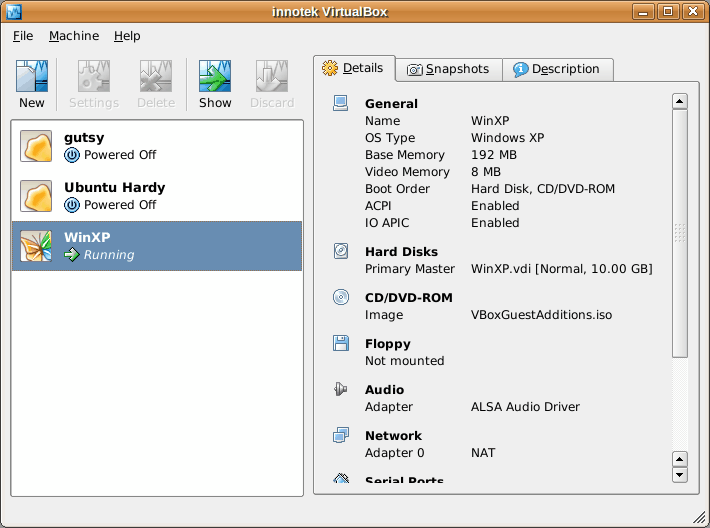
(The machine name to pass to the VBoxManage startvm command is the text in bold)
To start the Ubuntu Hardy Virtual Machine from the command line I would simply use VBoxManage startvm "Ubuntu Hardy".
Similarly, to start the WinXP vm, I would need to type: VBoxManage startvm "WinXP".
So, it should be obvious by now that to create a desktop icon, panel button and the like to start a VM, or to start one automatically during boot-up for example, you just need to use the appropriate command-line instruction in your script, icon configuration or shortcut.
There are a great many parameters that can be given to the VBoxManage utilty. Running it without any switches gives a brief yet comprehensive overview. The VirtualBox documentation pages have plenty more details.
Hope this helps the many Googlers out there.
SUN to buy VirtualBox
Sun Microsystems Announces Agreement to Acquire innotek, Expanding Sun xVM Reach to the Developer Desktop
SANTA CLARA, CA February 12, 2008 Sun Microsystems, Inc. (NASDAQ: JAVA) today announced that it has entered into a stock purchase agreement to acquire innotek, the provider of the leading edge, open source virtualization software called VirtualBox. By enabling developers to more efficiently build, test and run applications on multiple platforms, VirtualBox will extend the Sun xVM platform onto the desktop and strengthen Sun’s leadership in the virtualization market. This software is available for all major operating systems at www.virtualbox.org and www.openxvm.org.
Wow! Sun is really moving. This acquisition expands their ability to get into enterprises with OSS on the desktop as well as in the data centre.
VirtualBox is a really great virtualisation engine which sits very well on top of my Linux desktops and servers. For example, it enables us to run the dreaded Windows inside a secure cage on our safe and sound Linux infrastructure. For when we need to do integration testing or migration development.
With SUN buying MySQL, and now Innotek they are moving horizontally across the enterprise, gaining more traction where M$ is currently king…
Think about it. Sun now have,
- Operating System (Open Solaris, or they could chose to support any of the Linux flavours out there too)
- OpenOffice.org desktop application suite that is gaining traction very fast world-wide
- One of the world’s most popular database engines used to power much of the web and beyond
- Cross platform virtualisation technology enabling almost any OS to any OS integration
What else do you think they might go for? Alfresco maybe? Or OpenBravo?…
I do believe there is a real strategy here… Are Sun aggressively going after M$, rather than simply being content to sit in the data centre? You bet they are.
Watch this space… The world is a-changing.
VirtualBox: Seamless Windows
I have one web based service provider that requires me to use Internet Explorer – Parcelforce; the courier firm.
I have been using IE running on Wine up until recently – but I had never got printing to work quite right. You see, when I schedule a shipment for something, their software creates a barcode and label in PDF for me to print. But their system needs me to have IE and the Windows version of Acrobat installed so the label pops up in an IE with the Acrobat Reader plugin window.
I have asked them to support Firefox and Linux but they didn’t even have the courtesy to reply to my email…
Anyway – Wine and IES4LINUX worked for me very well, but I have had to save the pdf file to disk then open the Linux version of Acrobat and print it from there. I have recently moved partitions around on my PC and am running a new install of Ubuntu, so I decided to try a different route for a change…
I installed VirtualBox (the latest .deb from their web site which is 1.52) on my Ubuntu Gutsy desktop and then dug out my old CD of Windows XP and started the install.
What a palaver that was! I had forgotten how laborious the install is: I have an XP “upgrade CD” so had to go and find my Full version of Windows 95, show it that, then type in the stupidly long code and answer lots of questions. And it seemed to take so long to actually copy the stuff to the VM. Then you get the Activation question, registration and lots of network activity…
However, once I’d got it installed, it booted up just fine (In fact it boots much faster in a VM than I recall it doing natively) . After installing VirtualBox’s “guest additions for Windows” you get an improved Windows graphics driver and better mouse control too. The mouse just works when you move the pointer over the VirtualBox guest window or back to the Linux desktop. No need to switch mouse control between the two OSes.
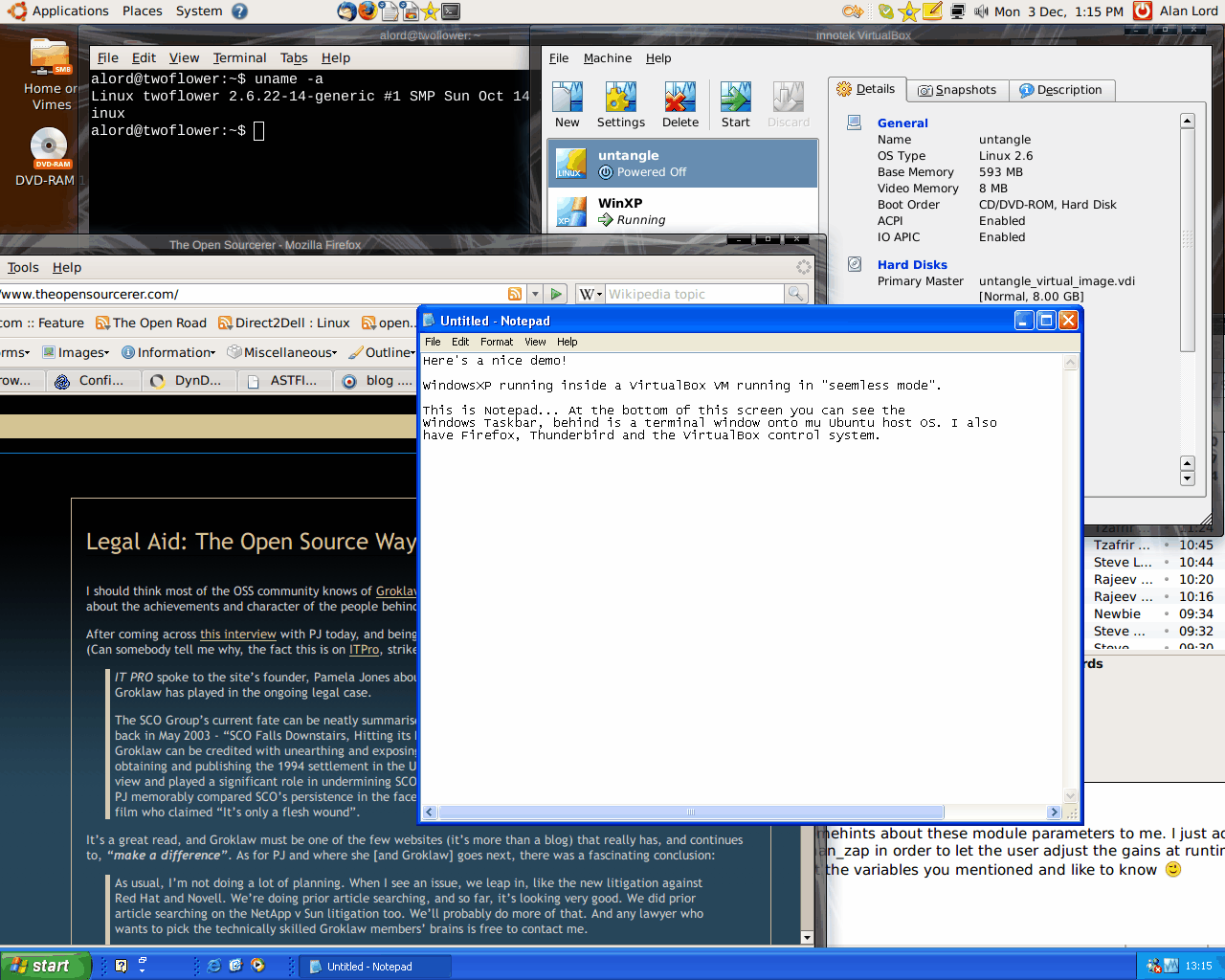
The other nice feature is something they call “Seamless Mode”. This is really cool, it means your guest OS can appear on your desktop without having to be inside a window. By that I mean you can run application (say notepad) and it will appear as a single window on your desktop. Here’s a picture to show you what I mean…
It’s a bit of a chore just to get access to a barcode label from ParcelForce, but I can do it. It only took me about an hour and I haven’t had to go and buy any software (I already owned my old copy of XP Home and Windows 95) or have to dual boot my computer.
The virtualisation engine is Open Source, the host OS is Open Source. And if Parcelforce would wake up and smell the coffee perhaps they might even keep a customer.


