Say hello to the webbook
We don’t often talk directly about our business activities on this blog. But once in a while something happens that rightly deserves a mention.
Our Open Source consulting business, The Open Learning Centre, has been very busy of late. We’ve been working with a household name hardware manufacturer and a very well known high-street retailer to deliver a really exciting and innovative product to the consumer market.
Say hello to the webbook (click for a very big image).
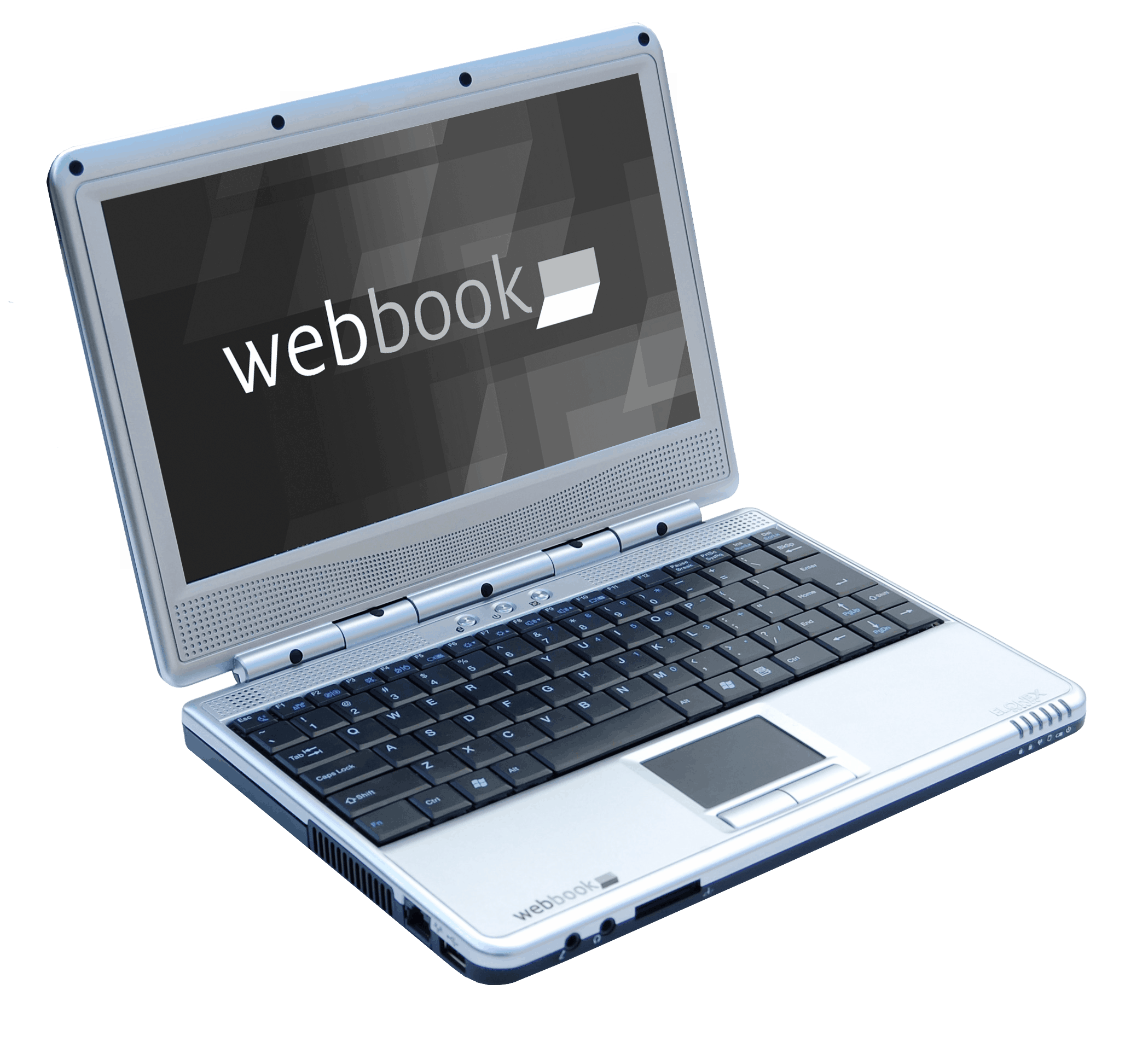
The webbook is manufactured by the UK electronics company Elonex and is being sold exclusively by The Carphone Warehouse.
The webbook is a high specification UMPC that has a 1.6Ghz Via C7 processor (x86), 512Mb of RAM and [currently] an 80G HDD. The screen has a very usable 1024×600 resolution and it has the usual assortment of USB, LAN and an SD socket, plus built in WiFi too. We have setup a blog specifically for the webbook here so users can get access to all the latest news, tips and advice. Be sure to add it to your feed reader.
The really cool thing about the webbook is the software. The webbok comes pre-loaded with Ubuntu 8.04.1, Hardy Heron, and some new software written especially for this application that delivers broadband connectivity over 3G Mobile networks.
With Ubuntu you get pretty much everything you will ever need included right out-of-the-box. You don’t need to go out and pay several hundred pounds to get legal copies of a word-processor, spreadsheet and email client. The webbook comes pre-installed with the fantastic OpenOffice.org applications suite and the Evolution mail and calendaring client. Web browsing is provided by the most excellent Firefox 3 and there are many more high quality and fully functional applications provided on the hard disk. A couple of examples are The Gimp for photo editing and Pidgin for Instant Messaging. Of course you also have access to Ubuntu’s on-line software repository where there are literally thousands of other programs and applications to choose from. And they are all free and are not “demo” or limited functionality versions either. Open Source gives you freedom, not restrictions.
The 3G communications software called Wader (GPL licensed, and funded by Elonex) was written by Warp Networks of Zaragoza, Spain. Their knowledge of this specialised area of communications technology and Python programming is superb and the chaps did a fantastic job to get the software ready for production in what were ultimately very tight time-scales. We have plenty of plans for new features and enhancements, and as the software is open source, community involvement is welcomed and encouraged. We will be communicating more on how to get involved shortly.
For anyone interested in Mobile Broadband, or just getting their mits on a webbook for that matter, the proposition from Carphone Warehouse is very attractive indeed: simply take out a contract (with Carphone Warehouse) for 3G Mobile Broadband with either Orange, T-Mobile or 3 and you get the webbook for free! Or, you can just buy the webbook outright. If you are in the UK, there’s probably a webbook near you now. They are available on-line or from their many high street shops.
Our role in this was to work with Elonex to get the right software packaged and delivered on time to Carphone Warehouse. We introduced Elonex to Canonical in London (now can you guess where I am?) who are the commercial enterprise behind the world’s most popular Open Source Operating System, Ubuntu. We orchestrated the 3G development track with Warp Networks and carried out testing as the code was being produced. And we coordinated and managed the packaging and development of the software bundle as a whole.
Here’s the other side of the webbook:

Tags: 3G, Open Source, OpenOffice.org, Ubuntu, Warp, webbook


Hello forum users, my names Jon.
Well anyway, I am considering getting one of these webbooks this year, but I’d like to ask those who have purchased the following:
– Can you use word/excel etc. on it?
– Can you use shockwave on it?
– Will I be able to use Windows Live on it?
I don’t understand computer literature that much, nor take much notice to RAM, memory and such alike.
I’m merely asking; does this “webbook” contain the capapbilities an average laptop would? Does it have compatabilities for my above questions?
I appreciate your response, thank you.
Jon.
@Jon, thanks for dropping by and asking some good questions! I’ll answer the ones I know about and hopefully others can help out where my knowledge is lacking.
– Can you use word/excel? The webbook ships with a different operating system called Linux. This doesn’t run Microsoft applications which are the names you used. However, The webbook comes pre-installed with a free and open Office Application suite called OpenOffice.org (http://www.openoffice.org) that features a Spreadsheet, Word Processor, Presentation and other applications that are very similar to Microsoft’s products. OpenOffice.org can also save and read documents in Microsoft compatible formats as well as Open and globally standardised formats too.
– Shockwave. No is the simple answer. Flash is fine. But Shockwave is an old predecessor to Flash that is no longer maintained and there is no version compatible with Linux. There may be workarounds using a Windows Compatible Application Layer that can run on top of Linux, but I personally have not tried this although my son keeps asking me so that he can play some of the games on Miniclip.
– I don’t use any Windows products or services really and I don’t know what Windows Live is. Sorry.
You can get an even better idea of the webbook over on the webbook blog: http://webbookblog.com/. There are some useful tips and introductory articles and the start of a community of interested users.
Hope this helps and thanks again.
hi all we brought our webbook today, but we have an 02 connection to the internet is it possible to connect to the internet with this or not?
thanks emma
@Emma, hi.
The answer to your question depends on a couple of factors:
1. Your O2 connection. I am unclear what you mean here. This could mean you have a regular cable broadband service from O2 for your home internet access, Or it could mean you have an O2 3G Dongle and contract. Or it could even mean something else… If it is the first then there should be no problems connecting – either use the internal WiFi port (You will need to hit Fn+F1 to turn the hardware on first). If it is a 3G contract then it really depends on 2.
2. What model of Dongle you have. Most of the mainstream devices are already supported but there are a few less popular models, and new ones reaching the market, that have not been tested and may need some work to support.
Am I on the right track?
I would also strongly recommend visiting the webbook blog for much more information than you will find here. This is a more “general” blog about Open Source Software. We have set up the webbook blog specifically to provide a place for webbook users to congregate, get and share tips and news, and to generally feel part of a community.
hi its an 02 dongle and contract the model is NRM-MC930D i have contacted webbook blog and am waiting for there reply. i think that is the model number i would really appreciate your help with this
thanks emma
I setup and used my new Webbook today and was dismayed to see the graphics card problem was still around. Do you know if new drivers are going to be available to fix this?
At each turn on after the ubuntu splash screen the graphics corrupt everytime and 3 times so far the main screen has also corrupted (with vertical lines on screen).
Apart from this prob (which is a big one in my mind and might lead me to returning webbook) I’m happy so far with my mini ubuntu laptop 🙂
Gav
@Gavin,
hold on there… VIA have a perfectly decent driver for this hardware, it just isn’t being “wrapped” up nicely with Ubuntu – yet. If you visit the webbook blog and specifically read this set of posts (http://webbookblog.com/?cat=16) in reverse order, it should help you to understand how to install the new driver from VIA. This will not only fix the screen corruption issues but will also enable you to experience a full 3D accelerated desktop environment.
HTH
Alan
Alan,
Many thanks for that, seems to be working fine. Misled you with my returning Webbook comment, I meant return to shop for different one just in case it wasn’t a driver problem.
Used the webbookblog now for a few tweaks (including the one you sent me there for :)) so will be bookmarking that for future reference.
Now just to get sound working with online radio stations 🙂
Thanks again.
when Via come out with a new Video driver for Linux then theyu can add this to a OEM install of 8.04 and it will come preinstalled fixing video problems
URGENT QUERY Re Mobile Broadband modem Huawei E160G
Dear Alan,
Could you please let me – and everyone else – know asap whether the Wader 3 G software on the (Ubuntu Linux) webbook will work (via Applications – Internet – Mobile Broadband connection) with the Huawei E160G, which is now 3’s standard contract modem, replacing the E169. (I chose 3 because it has the best coverage. T-Mobile and Orange are no good where I live.)
The E160G is not listed on the Wader website you linked to and I was told by someone from the Geek Squad that it won’t work with the webbook.
However, it is the one I was given when I bought my webbook a few days ago and when I tried to exchange it, as advised by the Geek Squad, I was told the E169 is being withdrawn because of ‘software issues’ and is no longer available from CPW. I was told that if the E160G does not work, I would have to return the whole package, including the webbook. But I don’t want to do that!
There must be many other people in my position and this is surely a big issue for CPW, but CPW staff are pretty clueless about the webbook, regrettably.
Any chance of you (or Alan Bell) contributing a plug in for the E160G post haste?
Has anyone else tested it?
Any help or information would be much appreciated.
Hi Alison and thanks for your comment.
I wanted to check before I replied to make sure. We have been informed by Carphone Warehouse that they “have never sold a 160g with a webbook and this must have been a sales error.”
We have tested the E160G and it works – a bit – but it is unreliable. Huawei in their infinite wisdom have yet again released a new product that uses the same USB ID codes as other devices. As far as Linux is concerned the E160G is an E220. But it does not work as reliably for reasons we have not investigated as it is not being sold 😉
I guess, from the reply we got from CPW that you should ask your shop for a different dongle. When we did the original work for this project, “3” were using the E169 and we haven’t, up until now at any rate, been asked to support the E160.
Alan
Hi all, just for people’s info, if you want to buy a webbook today, you would spend £273.99 for a windows standalone unit (no contracts)but this includes postage of £14.99, if you can be bothered going to the store its the same price ie. £259. However as we’re promoting the linux machines here you can pick one of these up in store for £239. Not bad I think.
I got the windows model yesterday, all is working brill, can watch online video really well. Had one initial set back which is that the wireless was turned off frow initial start up and immediately thought it was broken, however pressing the function button ‘Fn’ together with F1 switches this on & now all is well.
Will let you know how I get on with it as we go.
Hope this is useful to at least one person.
Cheers
Ebsy
hi people.
just recieved webbook reg,got online, and found the @ key pad. can u tell me where i can get imformation on the keypad and use of, so any other little secretes come to light. noet key on webbooks in shos are different to my model.thank you.will
Friend has one of these but it seems to be currupt in some way, get blank screen after setup loads.
Where can i get an image to re-install?
whats the max ram i can expand to. seen that it suports up to 1GB. can I go up to 2GB ???
@Dan and @Badger,
Thanks for dropping by. Can I suggest you visit the webbook blog? There is a good collection of information there that should answer most of your questions. We are hoping to set up a forum shortly too so the community of webbook owners can talk to each other and share tips and ideas.
I went to my friendly CPW shop in Worthing today. Their data shows that the Linux machines have all been withdrawn from stores, but are available to order from central warehouse. I have my dongle etc. from them, and hope to have the Linux webbook I ordered delivered on Tuesday.
Is this indicating a serious fault, or a marketing problem? Martin
Hi, I’ve been given a webbook by work (yes, I work for CPW) – it appears the ubuntu webbooks haven’t sold very well so the company seems to be pretty much solely selling xp ones these days, and are handing out the ubuntu ones as ’employee laptops’ – suits me!
I’ve dabbled with ubuntu before but always ended up going back to windows as though I like the idea of linux I’ve never really had the time or patience to learn it properly and have ended up doing something wrong and seriously buggering up my computer on several occasions and thought ‘screw it, I’m going back to windows’, but now I have a dedicated, separate linux laptop I can play, learn and screw up to my heart’s content!
Anyway, the main reason I’m posting is to say I found your excellent webbook blog last night, and was going to have a proper look at it today and try out a few things on it, such as getting compiz up & running, but it seems to be down today for some reason. I’d have taken a more direct approach but I couldn’t see a ‘mail me’ button around anywhere, and this seemed the most appropriate place to bring it up…
Cheers
Hi Neil,
Thanks for your comments. Lucky you getting a webbook for free!
We were with Elonex yesterday discussing the Ubuntu webbook and CPW, and they do seem to have stopped selling it with Linux for the time being at least.
There are many reasons for this, but it isn’t really because there’s anything wrong with the Ubuntu version. We believe it has been more to do with the customer’s perception of what it is they were getting and their unfamiliarity with Linux.
The webbook with Ubuntu Linux isn’t finished though. I can’t say anything more just yet, but hopefully quite soon there will be some more exciting news regarding this project.
And of course, anyone who buys one with XP can always remove XP and install Ubuntu 🙂
The webbook blog has been a very popular resource and that will continue, so please make full use if it. It is back on-line now.
All the best
Alan
i have same problem as alot of people MY FLASH PLAYER WONT INSTALL
oops sorry wrong button! lol anyways i have tried all the suggestions with opening the terminal downloadin the .deb file and all that jazz im not used to this at all!! im used to windows!! what am i doing wrong!!??
Hi Sam,
you really need to drop by the web book blog. I think you will find the answer you seek there.
Cheers
ive looked on there still waiting for reply still having no luck. think ill install windows
thankyou alan
Have you read this http://webbookblog.com/flash-ah-ahh-hell-save-every-one-of-us/ post?
yep i left a comment on there to be answered i tried all the suggestions given but still not working not ure if its because when i click on open file wit something called Gdebi package installer opens it? not sure which program i need to open flash player.
@Sam, there is an interesting situation regarding Flash right now as Adobe have withdrawn Flash 9 and in doing so broken the Ubuntu Hardy flash installation package. This has been reported here https://bugs.launchpad.net/ubuntu/+source/flashplugin-nonfree/+bug/304969 but does not seem to have a particularly good resolution as yet. You could go to http://get.adobe.com/flashplayer/ and download the .deb file for Ubuntu 8.04+ and install that (yes, gdebi is the package installer, put in your password and let it do it’s magic). Do let me know what happens with precision and the full text of any error messages, preferably on webbookblog.com.
@All
Update the source list using the following command
sudo apt-get update
Install flash player Plugin using the follwoing command
sudo apt-get install flashplugin-nonfree
hi alan i tried and tried and i finally gave in my webbook now has windows on it and it works so much better so big thumbs up for windowsa all programs work flash works and i dont have to mess around with the terminal!! but major big thumbs down for ubuntu!! some good apps n things but not practical!
thanks for all your help alan
sam
@sam,
Flash isn’t part of Ubuntu, any more than it is part of Windows. Adobe have done a not-so-great job of packaging Flash for Linux and they moved some stuff on their site which broke the Ubuntu package that simplifies Adobe’s installer. Technically this is 100% Adobe’s fault. In practice some people don’t care and interpret any difficulty as a fault with Ubuntu. Unfortuntately you didn’t describe your problem or what you tried to do about it so I was unable to help you very well other than guessing at a common problem you may have run into. I have Flash 9 and 10 running on several of my computers and on some others I use the Free Gnash player, which is perfectly packaged and is GPL licensed. Flash does work on Linux, but if it didn’t then I would rather live without Flash than live without a Free as in Freedom operating system.
Hi All
I haven’t been back here since I got my Linux Webbook back in September 2008 and I can’t believe some of the comments I have read. Are people seriously expecting this great piece of kit to do everything for them.
My reasons for getting the Webbook were simple:
I wanted a PORTABLE computer, not a replacement for my desktop
Whilst I don’t need 3G, I sometimes like to be able to connect to WiFi, but its not crucial
I don’t need to play Half life 2 or Crysis on the move
To be able to create and edit documents
To be able to view recently taken Photo’s and edit them
Not to need to carry it in a bag that screams “HEY I’VE GOT A LAPTOP, MUG ME”
So far (and I’m not a Linux expert) it has done everything I’ve asked of it
It recognized my DSLR / phone / printer and connected to my home and other wireless networks
I bought it for what it was
small, portable and lightweight
As for Linux, well Flash is used for YouTube and guess what, If you can get over a short attention span and get to know your Webbook you will find a free flash player.
Hi, what can you do if you’ve forgotten your username and password? there seems to be no ‘forgotten password’ option.
cheers
Hi
Didn’t know how else to let you know that the webbook blog website has been down for a week.
I bought a windows webbook I replaced windows with ubuntu 8.10. I have had a couple of problems with it crashing, especially in totem movie player. I also need 3D graphics so I can play penguin racer.
I there any way in which I can install 8.04 which I feel is more stable?
thanks.
@kev, http://webbookblog.com/oops-i-forgot-my-password/
@Graham, yeah, sorry about that http://webbookblog.com/gone-out-back-soon/
the trouble with the 3d graphics is that VIA have failed to come up with the goods on the drivers so they break on every kernel update. The 8.10 open chrome drivers are stable enough, but don’t do 3d.
hi Alan
Could somebody please turn the computer that hosts the webbook blog website back on?
thanks
Ditto Graham’s comment re the website above.
I have spent the last 3 hours or so surfing (I knackered!) to try and find the instructions to correct the screen resolution – which I have used before so I know they work but did not keep a copy – following a fresh webbook install only to find that the links all point to the blog but the url does not exist….. 🙁 Needed urgently. Please either bring back up or provide me with instructions / link(s). Thank you.
Elonex don’t seem to care very much about the existence of the webbookblog, or the hundreds of hours of effort that have gone into it. I have no idea why, but I still think it serves a purpose. I have a backup of the site, and I have control of the domain so I think I will put it on one of our servers rather than waiting for someone at Elonex to turn it back on.
Excellent… 🙂
ok, all the articles and comments have been restored, but not much else. I will try and get the images back at least, and possibly the old theme, but I am not at all averse to putting a new theme on it.
Thank you….
Hi,
Sorry to be a pain but could you provide a link or something to the scripts/images needed for the “keystroke guide to factory restore” tutorial as the DSN is unresolved! Thanks.
[…] you which I hope you’ll find interesting. Today’s victim *ahem* I mean subject is the Elonex Webbook from Carphone Warehouse with Ubuntu Hardy pre-installed. In the last year or so since the launch of […]
I recently purchased one of these machines from a computer fair for my girlfriend. We haven’t gotten it running yet because the hard-drive ( and caddy ) was missing from the box.. a packaging error.
We have quite high hopes for this machine, it’ll be getting pushed as far as the hardware ( which we’ll be upgrading ) can go and then some. Reading it can run Compiz from the blog came as quite a surprise 🙂
I just wanted to make a small correction. You can use Microsoft Office in Linux using a recent version of Wine, my father who recently converted to Ubuntu currently has that set-up. Some versions ( XP from personal experience ) do not work, refuses to install, but 2003 works well.
Hope this helps
@ Alan Lord: did you ever find the answer to Guy’s question? as I want to know as well 🙂
Hi,
What is the BIOS SETUP UTILITY settings as our webbook is not working, it stays on the open webbook screen i press DEL to take me to the BIOS SETUP UTILITY screen this has been messed with what are the settings please. Also i get at times a message “REALTRACK” then alot of numbers or i get “GRUB LOADING” message or something not found press any key message can someone help. BIOS SETUP UTILIY settings.
hiya im aving the same problem with my webbook and i just wondered if u managed to get urs sorted out.
hi adamo
so you have a webbook that isn’t booting past grub. I don’t think there is a bios issue or it wouldn’t get as far as grub, grub is a little program at the very start of the hard disk which then goes and loads the rest of the operating system. If you get a grub prompt then the disk is spinning and talking to the rest of the computer. It would be quite interesting to know what the something is that is not being found. I think the other message you see is when you end up trying to do a PXE network boot using the Realtek network card, I don’t recognise “REALTRACK” as a message that could come up at boot time.
Hi.
I’ve had my Webbook (Linux) since it first came out in 2008 and up until now it’s done everything I’ve asked of it. Then I made a big Mistake, I allowed it to upgrade to Ubuntu 10.04.
The first problem was screen resolution, even after connecting to an external monitor which confirmed it was set to 1024×600, the screen on the Webbook was only a small part of the full screen. No matter what I tried to get the Webbook to go back to 1024×600 (unless I’m missing something).
The next thing I did was to download Ubuntu 10.04 Netbook edition and set it up to boot from USB, it got so far, but then the screen corrupted so as to make it unable to go on.
All I want is to get my Webbook back without having to resort to changing to XPoop!
@brian,
You simply need to edit (or create) a /etc/X11/xorg.conf file with the right parameters for the screen. Use the same method Alan bell recommended for 9.10 on the webbookblog here: http://webbookblog.com/ubuntu-9-10-the-karmic-koala/
Brian,
Currently on my way home from a trip but if this hasn’t been answered by time I get back, I’ll borrow my fiancee’s netbook and see if I can get the display working on 10.04 and, of course, let you know 🙂
Hi Alan and Xyem
Thanks for responding. I’ll try Alan Bell’s method over the weekend if it works from a USB stick as I don’t have an external CD/DVD drive.
I am looking to link my webbook to my TV. One lapptop works but the webbook wont link? using the right cables, does it need soft or hard ware added to make it work???
many thanks
Hi, I’m USELESS with computers! I have the elonex webbook operating ubuntu. My partner tried to fix it, but must have uninstalled the wrong thing now I can’t see the screen right at all! Is there anyway I can just completely reset my whole system, keeping in mind that past the log on screen I can’t see anything! Need help!
Thanks.
hi….just wondering are you able to install steam game softwate on to webbook’s so that games etc can be played? football manager 12 to be precise it has a lot of data so may run slowly anyway.